 Watch insteadHow to Build a Test Sequence and Export a Standalone EXE | Electronics Test Automation9:40
The builder
Code and the package
TestFlow does not run a hidden interpreter over your workflow. It generates a complete, standalone Python application, and the Code pane is that application.
This matters for two reasons. You can read exactly what will touch your hardware before it does, and you are not locked in: the package runs on its own, with or without TestFlow.
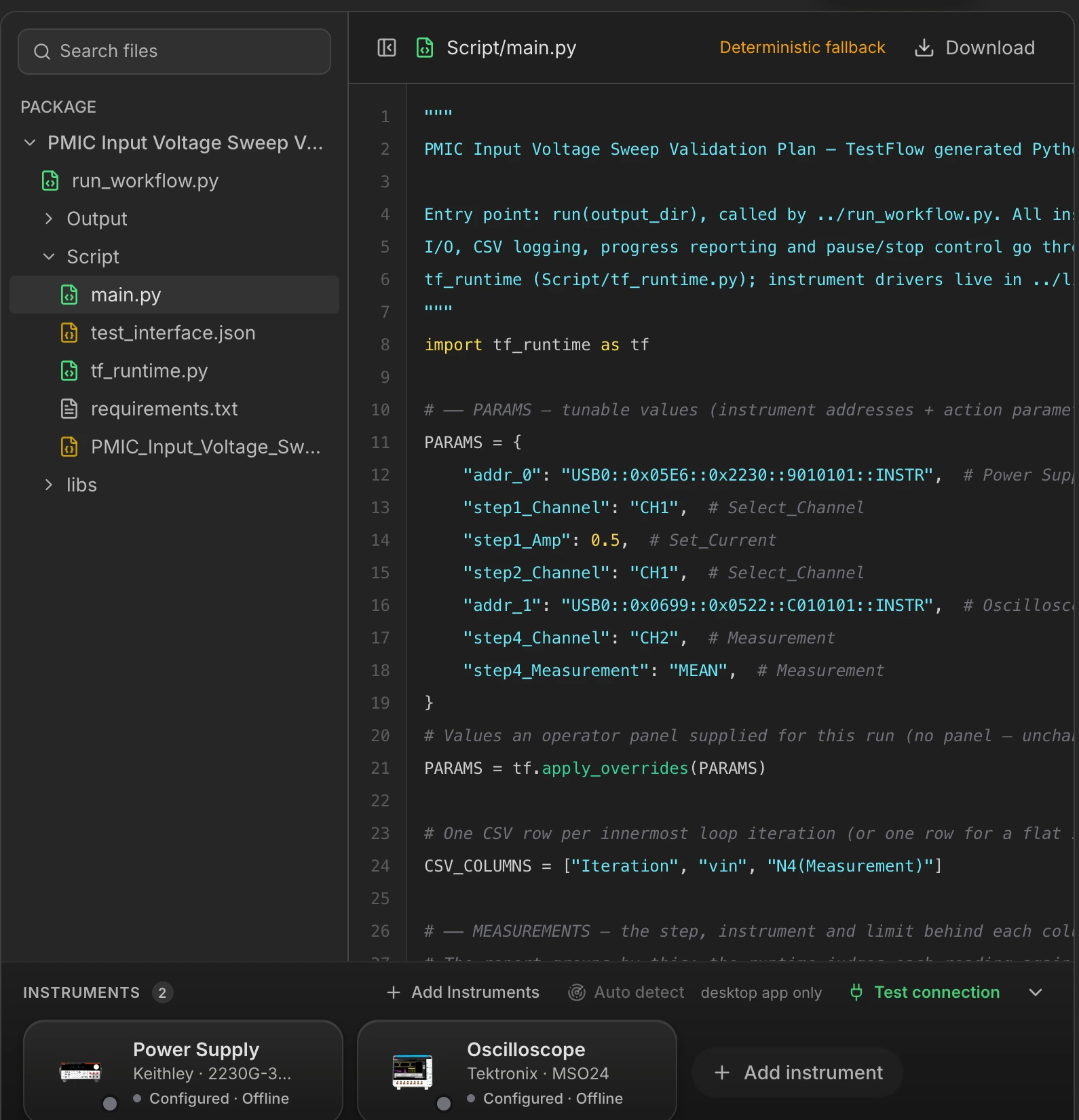

What is in the package
<Project name>/
├── run_workflow.py            the single entry point
├── Script/
│   ├── main.py                the test sequence
│   ├── tf_runtime.py          VISA and serial I/O, CSV recording, limits, control
│   ├── instruments/           generated driver modules, when the bench needs them
│   ├── N1.py, N2.py …         your Python steps, in order
│   ├── requirements.txt       pip dependencies
│   └── <name>_workflow.json   the full workflow, exported
├── libs/                      shared instrument libraries
└── Output/ results land here: CSV, log, report| File | What it is | Why you might read it |
|---|---|---|
run_workflow.py | The entry point. One command runs the whole test. | This is what you invoke outside TestFlow. |
Script/main.py | The sequence: set-points, loops, delays, measurements, limits. | To check what is actually being sent, and in what order. |
Script/tf_runtime.py | The runtime layer: opens instruments, sends and queries, records rows, evaluates limits, handles stop and pause. | To understand how a measurement becomes a row with a verdict. |
Script/instruments/ | Driver modules for instruments with no command catalog. | Present only when your bench needs one. |
requirements.txt | The pip dependencies, including anything your Python steps declared. | Before running the package on another machine. |
Output/ | Empty until a run. Then the results CSV, the full log, and the PDF report if enabled. | This is where your data is. |
What the generated code looks like
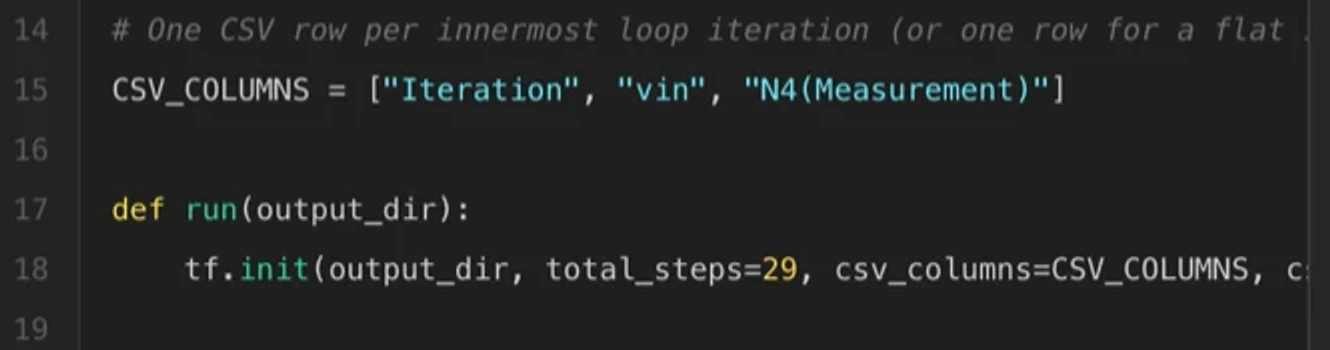
Three excerpts from a real main.py, in the order they appear in the file. Together they are the whole shape of a TestFlow package.


Two ways the code gets written
Compiled, deterministically
Every instrument on the bench has a command catalog
- A code emitter walks the workflow and writes the Python directly.
- No model involved. Instant, free, and identical every time for the same workflow.
- Set-points are collected into a parameters block at the top of main.py, so you can retune a sweep without touching the logic.
Written by the codegen agent
The bench contains an instrument with no catalog
- A second, non-chat agent writes a driver module for that instrument.
- It runs on a debounce after the workflow’s STRUCTURE changes, not on every keystroke.
- Retuning a value never re-triggers it. Adding or removing a step does.
Generated code is not trusted on the model's word. Before a package is accepted, its Python is parsed for real, every runtime call is checked against the runtime's actual public API, it is checked for hard-coded instrument addresses (a generated driver has to take its address, not bake one in), and its connection setup is checked against the configured bench. Output that fails goes back for one repair attempt, and if it fails again the deterministic compiler takes over.
Reading and taking the code
- Click any file in the tree to read it, with syntax highlighting.
- The
libs/tree loads on expand, because it is a shared library and not part of your generated output. - Download saves the file you are currently reading, so you can drop
main.pyinto an existing project or send one driver to a colleague.
Before it touches hardware
When a run would execute a generated driver against real instruments for the first time, Executor asks you to approve it and shows you the code first. Approval is remembered per workflow structure, so retuning values does not re-prompt, but changing the shape of the test does.